When I travel, I need to have a second monitor. I have a small Wisecoco monitor that I purchased from Amazon. It works well, but it is one more thing that I take with me when I travel. I had thought about turning my iPad mini into a monitor as it is about the same size as the Wisecoco monitor.
I started looking around and found some options, but not pleased as many seem to require an internet connection or at least a monthly subscription. I don’t mind paying a small fee for software so I can use it for many years but do not want to pay on a reoccurring basis for something that will only be used occasionally.
I found a blog post on Joey’s Retro Handhelds that talked about setting up Apollo on the PC and using a client such as Moonlight on the iPad to add the iPad as a second monitor. I was able to follow the post at https://www.joeysretrohandhelds.com/guides/apollo-artemis-streaming-setup-guide/ and have it setup in no time. I did run into one issue while playing Udemy videos, but there is a quick fix in Chrome, which is to disable graphics acceleration in the System settings. Once I did that, I could use the iPad. The audio does play on both the iPad and PC no matter which way the audio settings are setup. I will need to play with it a bit more to have it only on one or the other. This has an easy workaround, which is to mute the audio on one of the devices.
Hope this helps you lighten your load and increase your productivity on the road.
I apologize for not posting this sooner. I’m currently on vacation and do not plan to post anything until 20 September.
While I’m on vacation, I will be trying out a few things and techniques that I will share with you upon my return. I also have a few unopened boxes at home which I will be getting into and sharing reviews and information on those items in future posts.
Thank you for being part of this adventure as I shift content for the blogs and the site. When I return, I plan to dive into more reviews and keeping to a more steady schedule.
I hope this post finds you well. Today, I want to share some exciting news about a change in direction for this blog and site. I’ve been attempting to write about the various electronic projects I’ve been working on. However, I’ve found it challenging to maintain a consistent posting schedule and provide the depth of content I aspire to.
The Shift to Reviews
Interestingly, I’ve noticed that my recent posts have leaned more towards reviews of electronic modules and gadgets. While this is not what I set out to do with this site, it seems to be a good direction to move forward and write valuable content for the community. Therefore, I’ve decided to embrace this change and focus the blog on providing detailed reviews and information.
What to Expect
Moving forward, you can expect more frequent posts, which will include more information than is possible in a review on a merchant’s site. I plan to focus on reviews of electronic modules, and when appropriate give you information on how to use them with Raspberry Pi and/or Arduino. Some of the things that my posts may include:
Sample Code: Practical examples to help you get started with the modules.
Tips and Tricks: Insights and advice based on my hands-on experience.
Project Ideas: Suggestions on how you can integrate the modules into your own projects.
Supporting the Blog
In an effort to generate revenue and keep the blog sustainable, future posts will include affiliate links to the products I review. If you find my reviews helpful and decide to purchase the products through these links, it will help support the blog at no additional cost to you.
Join Me on This Journey
I’m excited about this new direction and hope you are too. Your support and feedback have been invaluable, and I look forward to continuing this journey with you. If you have any suggestions or specific products you’d like me to review, please feel free to reach out.
Thank you, let’s explore the world of electronics together, one review at a time!
Apple Vision Pro user (Image from Trusted Reviews)
I read an article today titled, “I Know What the Apple Vision Pro Is For” in the New York Magazine. It was very interesting seeing how the Apple Vision Pro (AVP) is making a difference in the lives of people with disabilities. I find it amazing that Apple was able to make the device so accessible but see why they were able to be successful. They still have some work to do as the article points out but they have done a great job with the device.
Apple was able to be successful because they have developers on the team, who themselves have disabilities. This provides a few advantages for producing something that is accessible. First off, the developers have first hand knowledge of what will work and what will not. It is like having the business owner writing code or making design choices. Secondly is developers, who do not have disabilities can get near instant feedback.
I have not had the opportunity to work with someone who has a disability. I have worked with one individual many years ago, who I believe had oculocutaneous albinism, just as Maxine Collard, in the story. I recall that they had a jewelers loop and would get right up to the Cathode Ray Tube (CRT) monitor to see the screen. I guess that made the article a bit more special to me as I saw their struggles first hand and can imagine Maxine Collard’s interactions with the computer and other challenges she faces.
Getting near instant feedback is important to writing better code and really for doing anything well. I recall the first time that I worked on a project where the development team needed to write unit tests for the code that we were writing and coupled with DevOps and automated testing. It was a powerful combination. I was able to check in code and tell within a few minutes if the code was going to break the build or not. It was great when the code did not break the build but when it did, it was great to know it right away so the code was still fresh in my head. I did not need to get back into the mindset that I was in a week or two ago. Getting back in the mindset and remembering what you were doing when you wrote the code, why you made the design choices you did takes away valuable time that could be used to code the next chunk of functionality. I was so impressed by the time saving and the empowerment that near instant feedback gave me. I built a small device to show me the status of the builds.
Information Radiator for Jenkins DevOps Builds
The near instant feedback gave some additional benefit to the project team as well. It did not eliminate defects, but it did result in fewer easy to find bugs. I did increase development time but the added benefits I feel outweighed the additional development effort and given enough time, would actually reduce development time as the developers would improve over time.
The immediate benefits is the code would be more robust, particularly around data input validation and business rule checks. Testers can write code to test these things but it takes a great deal of time to test various combinations of data inputs, edge cases, and requested business rule behaviors. Unit tests and the execution of those tests when a developer checks in code catches most of the issues that can arise from these cases.
Additionally as I started getting use to the instant feedback, I found that I was checking in code more frequently and was more comfortable in breaking code and user stories into smaller pieces. The reason for this I believe is two fold. Firstly there is gratification in seeing that code is checked in and passes tests as it is working as expected. Secondly, there is greater confidence that I change something that may impact some other functionality as I can be somewhat confident that if the code will break anything else, I will know it once the code is checked in.
While the article was on accessibility, I think there were some other things to learn as well. Getting near instant feedback is a great path to creating something that is reliable and works as intended. You can still develop code that no one uses, but it will be quality code. If you want code that users will find is useful, you need to get usability feedback as soon as possible from the community that will be using the software. Apple is a great example by including people with disabilities on their development teams.
I have been reflecting on the site and would like to be more consistent on the timing of publishing blog posts. I had the idea that blog posts should have project details but felt overwhelmed and falling short with having as many details as I felt was necessary. I am thinking that creating specific project pages will be better for the purpose of
I plan to post some things that I’m working on, product reviews, or other things that I have found interesting. The posts will have a focus on electronics, 3D printing, laser cutting, Maker Community, or STEM.
Standing in front of the Laos National Convention Hall
I had the opportunity today to attend Lao Digital Week 2024. While one is on vacation, attending a convention is not usually an activity one would take but I wanted to attend this event when I noticed it yesterday, and an opportunity happened to open for me to attend. I had a great time walking through the exhibit hall and seeing how many businesses are involved with assisting Laos to move to a digital government with three pillars of Government, Economic, and Social. I saw vendors providing video conferencing options that are on-premises verses in the cloud to allow more control over data. (Not totally necessary as the cloud providers partition data to prevent spillage, but a nice option.) There were others presenting HR Solutions for paying staff in different currencies to facilitate importing staff with needed skills when required. Other services provided included electrical distribution and remote meter reading, network and device providers, vending, IoT, cashless payments, Government Services, etc.
One of the things that really got me excited was to see Maker Box. Maker Box is a makerspace in Vientiane, which is encouraging people to learn more about Science, Technology, Engineering, and Mathematics (STEM), through hands on learning. They are supporting startup businesses, with one of the first being an electric bike company and a remote farming monitoring system. In their booth, they showed off a few things that have been made in the Makerspace, including a prototype prosthetic arm, weather monitoring station for farming, a machine for taking plastic water bottles to turning them into 3D filament, and a game to help learn typing.
It seems that my Psion collection has been taking most of my attention. I’ve been testing some CF, SD, and microSD cards in my Psion 5mx and Ericsson MC 218. I also came across Kian Ryan’s Sidecar for Psion devices to connect them to the internet.
I had a similar idea to Kian’s Sidecar project but instead of an RS232 connection, I was thinking of an IrDA connection. I’ve purchased the items to build Kian’s Sidecar and plan to make one once all the parts arrive. Once I get that working, I plan to design and build an IrDA version. If all goes well, I plan to sharing it with the community. I think that an IrDA version would be much nicer as it would not require carrying a serial cable.
I’ve also purchased some 2GB CF, SD, and microSD cards as well as adapters so I could test them in my Psion 5mx and Ericsson MC 218. At first they seemed to not work, then I came across a video from Handheld Computing titled, “Formatting and Partitioning Compact Flash Cards for Psion“. The video is a bit too quick in key parts but slowing the video down and pausing it in key areas led me to a solution to get the cards working on the Psion devices.
Steps to format CF, SD, or microSD cards to work in a Psion PDA. Below are a few key takeaways of what needs to be done.
No partitions over 2GB
Format using FAT 16, not FAT32
Max cluster size is 32 KB
There must be some unallocated space on the disk. 1 MB is enough.
Below are some steps using Microsoft Windows and Mini Tools Partition Wizard software.
If you have not downloaded and installed Mini Tools Partition Wizard or similar tool, install the software first. Mini Tools Partition Wizard is free and available at https://www.minitool.com.
Launch the partitioning software, accept the Windows User Account Control prompt, then locate the flash card in the list of drives.
Right-click on the drive and select “Delete” from the context menu
Click the “Apply” button to make the changes
Right-click on the drive and select “Create” from the context menu or click “Create Partition” in the left side panel
Edit the following items
Make certain that the “Partition Align to” is set to MB
File System: FAT
Cluster Size 32 KB
Reduce the Partition Size by 1 MB so that Unallocated Space After is 1 MB
Optionally, set the Partition Label
Once the values have been changed, click the “OK” button
Click the “Apply” button to apply the changes
Close the software and insert the card into the Psion. If using a SD or microSD card, you will need to use a CF adapter.
The Psion should recognize the card.
If you see “Disk not present” or “Corrupt”, it is possible that the card will not be usable in the Psion. If you are using a SD or microSD card, it may be worth trying a different adapter. The good news is that every card I tested worked just fine after following the above process.
I did have an issue with a microSD to CF adapter but I was not surprised as it has a WiFi module in it. Most likely it was pulling more power than the Psion could deliver, which made it unusable. I had anticipated that but wanted to give it a try.
Below is a table showing the cards that I tried and a note if they worked or not. The cards names link to the Amazon product page.
There are many topics this week to cover, thus the reason for the non-descript title. Some of the things that have come up this week are Psion and Ericsson repairs, ChatGPT and DeepSource, and Agile2023.
Psion and Ericsson repairs
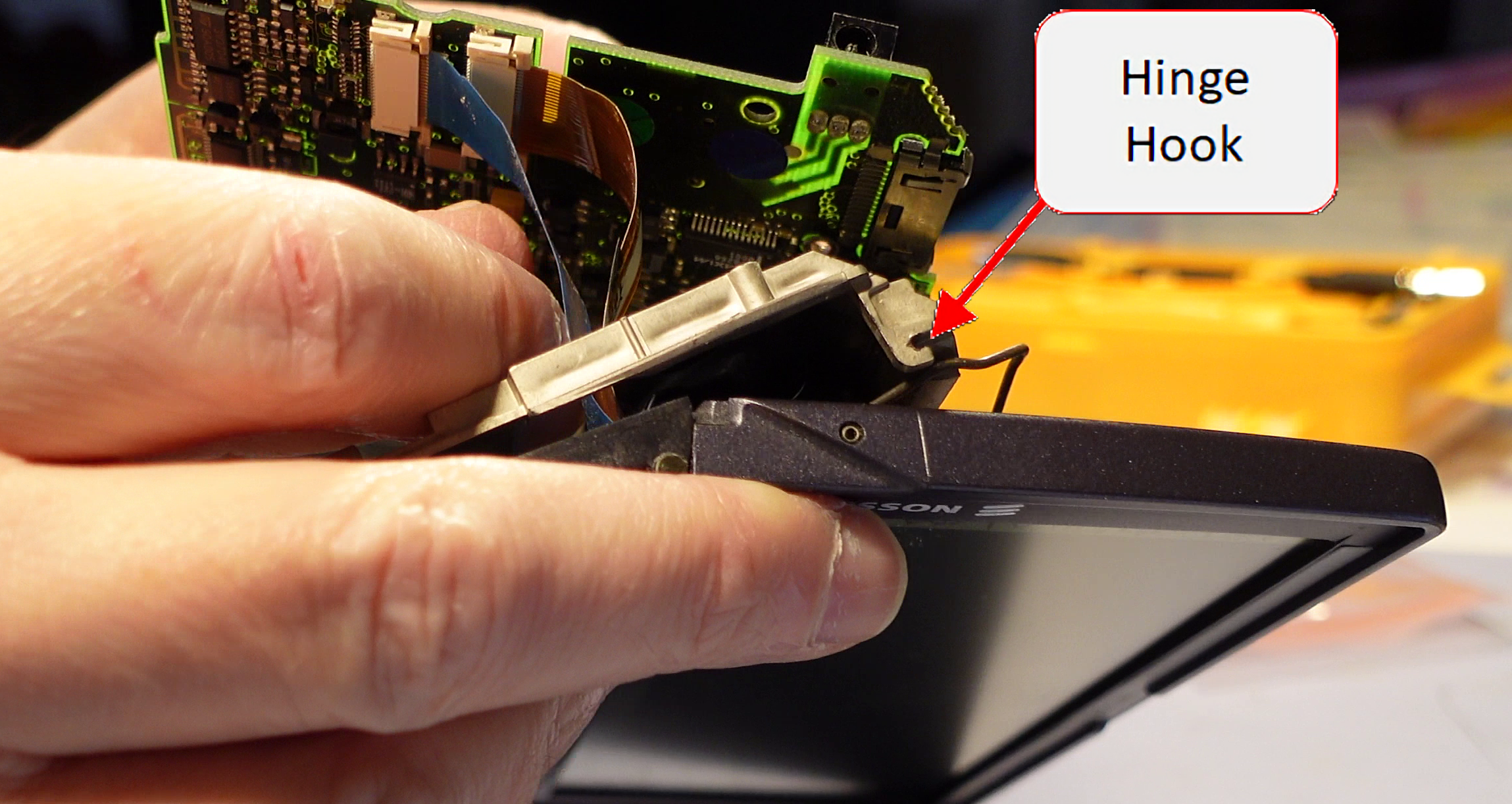
I was able to carryout another screen cable repair this week on the Ericsson MC 218. The MC 218 had the hooks in the back for the lid hinge so this repair resulted in a good as new repair. It did pose a challenge as the hinge is really not designed to be put in place while connected to the screen. I feared that I was going to break the plastic hooks so I worked to remove the pins holding the wire hinge from the screen. It was not easy and after I removed them, I saw that doing so caused a different challenge. The pins holding the wire hinges in place are actually spring metal wound up into a pin shape. This made them difficult to put back into place. The removal of the pins did make it much easier to get the wire hinges over the plastic hooks without breaking them, but I do not recommend doing that. If I carry out this repair again in the future, I plan to figure a better way to choregraph putting it all back together without breaking the hooks.
I feel that the terminology that I’m using to describe the hinge mechanism on the Psion 5 Series devices is not correct. If Martin Riddiford or anyone else in the know happens across this post, please add a comment below to let us know what the proper names for these are. Also a drawing with text pointing to them would be awesome as well.
I captured a video of the repair and hope to find some time shortly to edit it and post it to YouTube. I will post an update with a link to the video once it is available. In the meantime, here are some screen grabs from some of the video to show the hinge assembly and the spring metal pins referenced above.
Screen with showing wire hinges and spring metal pins.Unit with showing one of the two hinge hooks.A view of the other hinge hook.Another view of the hinge hook.
Hinge Repair
The hinge repair that I carried out last week, did not last long, which was not too much of a surprise. The metal pins bent and allowed the hinges to pop out from under the cover. I straightened the pins and used my 3Doodler, to add some PLA around the pins to give them a bit more strength so they hopefully will last a bit longer. The repair looked ugly but no one will see how bad I am at using the 3Doodler.
The opening and closing of the unit is very tight after the repair, which makes me a bit uncomfortable so I will take it easy when opening and closing the unit.
Hinge repair before and afterHinge repair before and after for the other side
ChatGPT and DeepSource
It looks like things may be starting to really take off in the Artificial Intelligence (AI) field. We are starting to see more and more application of AI in some of the products that we use. I had been following the latest news regarding ChatGPT and found it interesting that it was able to pass a law exam at two different universities. While it would not be at the head of the class, it is good enough to get a passing grade. This presents a lot of challenges for professors at universities.
I had not given it much thought until I saw a video, 10X Your Code with ChatGPT: How to Use it Effectively, by Dave Plummer showing how ChatGPT could be used by software developers and others. He showed how he was able to interact with ChatGPT to develop a small software application and how we all need to start to understanding how to use the tool in our workflows.
I have seen that Visual Studio is now prompting me with code completion, based on my previous actions and where I’m at in the code. It is kind of freaky seeing the IDE basically writing code for you. There were times that it seemed to get in the way but most of the time, it was a real time saver. I’m sure it will get even better in the near future.
We may be at at point in time when AI will really start to have an impact in how we work and in our daily lives. Let’s just say that it has my attention now.
DeepSource
As I was trying ChatGPT, one very good use case popped out, and that is to do code reviews. Typically I am a lone developer and one of the biggest disadvantages of being a lone developer is your code is rarely code reviewed by anyone. ChatGPT did a fairly good job but the length of code it can code review is very limited.
Looking into ChatGPT led me to look into tools for Code Review. I found an article at GeekFlare, 6 Best Automated Code Review Tools for Developers. The article listed DeepSource as number 3. I looked into the other options and settled on DeepSource. It has great integration with GitHub so it scans code each time it is checked in. I was able to clean up my code fairly quickly.
I’ve made a recommendation to the DeepSource Team to incorporate AI for code reviews, particularly for us lone developers. We may be a few years away from being able to have a really good AI performing code reviews, but I think that is something we will see in the very near future.
Agile2023
I received some news this week that my submission for the Agile2023 conference was accepted. Now, I need to focus on polishing and practicing the workshop. This will be my first time presenting at a conference, so I’m nervous and excited for the opportunity. I hope it goes well and starts me down a path for the future.
The past few weeks, I have been primary focused on preparing a submission for a workshop for the Agile2023 Conference. The purpose of the workshop is to get folks thinking about incorporating accessibility into software development early in the development process rather than waiting until the end or if someone files a complaint.
Most of the time, accessibility and compliance with ADA Section 508, is seen as a hindrance to getting development projects done on time or as a nice to have item. We need to get out of this mindset and challenge others who think this way.
One thing that I had heard elsewhere is that ‘we are all only temporarily fully enabled’. We will all face a disability challenge at some point in our life. As we age, our eyesight, hearing, response times, etc. start to diminish. Accidents and illnesses can happen at anytime and may result in one or more disabilities as a result.
If someone has a hard time thinking it is important to help others who are having challenges with technology, then have them think of themselves in 5, 10, 15, or 20 years from now. If they won’t do it for others, perhaps they will do it for themselves.
I propose that people should become the Accessibility Advocate on their team by speaking up when they see accessibility is not being addressed. Recommend performing accessibility testing, even there is no one or no budget available to bring to the team to do the testing. There are some tools that team members can utilize to perform some quick tests to identify areas that need more attention.
I’m not an accessibility expert but I’m an Accessibility Advocate for my project teams. It is a role that anyone can take on and is not as scarry or challenging as one may think.
Below is a list of some helpful information and resources. I hope you are interested in becoming an Accessibility Advocate on your project teams. Lease a comment if you find this interesting and would like more posts on accessibility.
Resources
WAVE: https://wave.webaim.org/ – Free Web Accessibility Evaluation Tool for checking accessibility of Web Pages
A bit of background of why I’m interested in accessibility
Admittedly, I do not have day to day contact with anyone who has challenges with technology but throughout my life, I have encountered a few folks that gave me pause to think about it. I was also working in industry when it started to become a real concern in the early 2000’s. I also worked on one project that was very concerned with ADA Section 508. My work on that project was one of the most challenging and most rewarding work that I’ve done.
My first encounter that I recall with someone with an accessibility challenge was a lady that I worked with who was having a problem with her monitor and asked if I could help her. She had a very large CRT at the time, I believe it was 21″ or 24″. I had not seen one that huge at the time (~1997). She had the resolution set to 640×480, which I felt was a waste for such a large monitor. I asked her if she would like me to increase the resolution so she had more area to work with. She said, no, if I did, she would not be able to see a thing.
Since that time, I had the opportunity to work with another individual who was loosing their eyesight and had special software to enlarge areas of the screen and other equipment such as a document camera so they could read printed text. I also worked with an individual who was deaf and required an interpreter during meetings.
When you see how some folks work with technology, when they have a disability, it does give one pause to think, how can their experience be better.
The one project that put accessibility front and center was one that required a video player that was fully accessible. I believe it was around 2008 and flash player was still the standard for incorporating video on web pages. Flash Player was not at all ADA Section 508 competent. I had attempted various things to make a video player compliant but could never get it to pass by the accessibility testers on the team. I finally found some work that was done by a professor at a university. I believe it was Ohio University but I may be mistaken. He had an open source video player that used an HTML wrapper and some JavaScript to interact with the flash player. It was claimed it was ADA Section 508 compliant so I gave it a try but the accessibility testers still found faults with it. I was able to modify the code to address the issues that the testers has uncovered and finally received their acceptance of the player. I was able to go back to the professor and provide him with the changes, which I believe he incorporated into the project. It was nice to be able to meet the challenge that the client presented and to give back to the community.
I’m hopeful at some point that I will be able to combine my love for electronic projects and my desire to work with the accessibility community to do some work such as what Bill Binko’s does with ATMakers,org. Besides Bill, someone who inspires me is Chris Young. He is disabled, with limited mobility but is able to do quite a few projects to give him the ability to do more things. Here are a few videos of Bill Binko, Chis Young, and ATMakers.
Dealing with PC issues at the moment so this week has been a bit rough.
My inspiration for the Portable Raspberry Pi came from the Ben Heck Show on Ben’s creation of a Portable Pi. (Part 1 & Part 2) I liked Ben’s design but there were a few things that I wanted to change.
I did not want to deal with having a batteries in series and not be able to easily charge them in the case without disconnecting them from the device. This requirement was due to Ben’s choice of LCD monitor so I am changing the LCD to an Adafruit PiTFT screen which uses SPI. This will be a bit trickier to use but should not be a problem.
I wanted to use the powerful Teensy for more than just the gamepad so I modified the Teensy code to provide a custom gamepad which has only the buttons that I will have plus provides keyboard and raw HID devices. The reason for these additional devices are for power management and control.
Power – I wanted to be able to charge the battery in the device and still be able to use the device while it was charging. To implement this requirement, I turned to Adafruit’s USB LiIon/LiPoly charger.
Power On/Off – The Portable Pi will be used by my children so I wanted to have an easy way for them to shut it down as well as to automatically shut it down when the batteries are low. This is where the additional Keyboard and Raw HID device come in on the Teensy. The plan is to implement a soft latching power switch circuit which can turn on the power to the device when pressed from an off state. When it is on, the Teensy will be able to detect when it is pressed and start an orderly shutdown of the Raspberry Pi. If the button is held down longer, about 3 seconds, then the power will be switched off. This will allow it to function much like the power switch on a PC or laptop.
Power monitoring – I would also like to be able to monitor the battery level and perform an automatic shutdown of the Raspberry Pi if the voltage is too low. This is where the Raw HID device comes in. I plan to use the Teensy to monitor the battery voltage and send periodic updates to the Pi to let it know the level. If the level reaches a min threshold then it will send keypresses through the keyboard device to tell the Pi to shutdown.
These are just a few of the high level requirements I have for the Portable Pi. So far, I have the Gamepad code completed and the hardware on a breadboard. I am currently working on the soft latching power switch. I have built a few circuits which work but only at 5 VDC. I need it to work at 3 VDC and higher so I need to order some parts as I do not have MOSFETs which will switch full on at that low of a voltage. I plan to implement a design found on Mosaic Documentation Web. I have built a similar circuit and found it to work well and meet the requirements that I have. I also looked at David Jones’s design on his EEVBlog but it did not meet all of the requirements that I have. It is a nice simple design so I am certain I will use it in the future on another project.




You must be logged in to post a comment.